
Proper illumination makes a significant difference when you spend hours working at your computer setup. Whether you are coding through late nights, editing photos that demand color accuracy, or simply answering emails throughout the day, your lighting situation directly impacts both productivity and comfort.
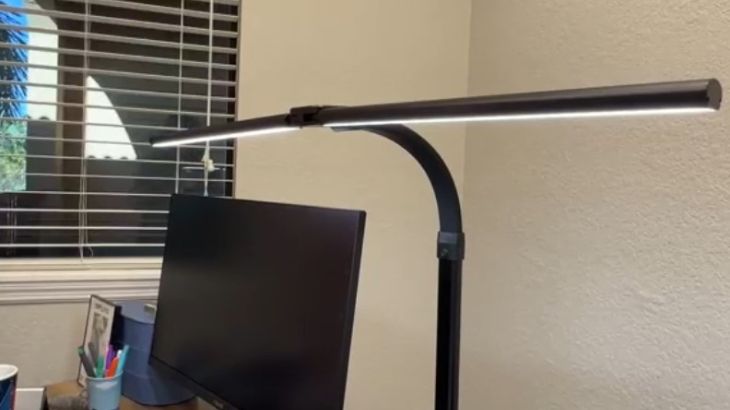
The best light for computer desk setups reduces eye strain while providing optimal brightness for any task. Poor lighting forces your eyes to work harder, leading to fatigue, headaches, and decreased focus over time. A quality desk lamp or monitor light bar eliminates harsh shadows, prevents screen glare, and creates a workspace where you can perform at your peak level consistently.
| Preview | Product | |
|---|---|---|

|
BenQ ScreenBar LED Monitor Light Bar -... | Show Price |

|
Quntis Computer Monitor Lamp, Screen Monitor... | Show Price |

|
Xiaomi Mi Computer Monitor Light Bar - Easy... | Show Price |

|
Lepro LED Desk Lamp, Metal Desk Light 9.5W... | Show Price |

|
EppieBasic Led Desk Lamp with Clamp,[Dual... | Show Price |

|
LEPOWER Desk Lamp, 800LM LED for Home Office,... | Show Price |
How Proper Lighting Impacts Your Workspace
Your choice of desk lighting goes far beyond simple brightness concerns. When working at a computer, your eyes constantly adjust between the bright screen and surrounding environment. If the ambient lighting around your monitor differs significantly from screen brightness, your pupils must continuously adapt, causing rapid fatigue and discomfort. This phenomenon explains why working in complete darkness with only your screen lit feels exhausting after short periods.
Quality computer desk lighting creates what professionals call balanced illumination. This means the light surrounding your monitor matches the screen brightness reasonably well, reducing the contrast your eyes must process. Monitor light bars excel at this task because they illuminate your keyboard and desk surface without reflecting off your screen. Traditional desk lamps sometimes create problematic reflections that make text harder to read.
Color temperature plays an equally important role in computer desk lighting. Warm light around 2700K creates a relaxing atmosphere but may cause drowsiness during focused work sessions. Cool light near 6500K mimics daylight and promotes alertness, though extended exposure can feel harsh. The sweet spot for most computer work falls between 4000K and 5000K, offering enough brightness for concentration without excessive blue light exposure during evening hours.
Eye strain prevention represents perhaps the most crucial benefit of proper desk lighting. Studies show that inadequate lighting forces eye muscles to work overtime, leading to symptoms like blurred vision, dry eyes, and tension headaches. Quality LED desk lamps produce flicker-free illumination that eliminates the subtle pulsing associated with cheaper alternatives. This steady light output keeps your visual system relaxed even during marathon work sessions.
Beyond physical comfort, good lighting enhances your actual work output. Tasks requiring fine motor skills, reading small text, or distinguishing subtle color differences all benefit from adequate illumination. Graphic designers, video editors, and photographers particularly need high CRI (Color Rendering Index) lighting that displays colors accurately. A lamp with CRI above 90 ensures what you see on screen matches your printed or exported work.
Energy efficiency matters for lights that run eight hours daily or longer. Modern LED technology consumes roughly 80% less electricity than traditional incandescent options while lasting significantly longer. A quality LED desk lamp may operate 50,000 hours before requiring replacement, essentially outlasting years of daily use. This longevity makes the initial investment worthwhile compared to frequently replacing cheaper alternatives.
Adjustability determines how well a light serves your specific workspace configuration. Monitor light bars attach directly to your screen edge, perfect for minimal desk setups. Clamp-style architect lamps provide maximum positioning flexibility for larger workstations. Freestanding desk lamps with stable bases work well when you cannot permanently attach fixtures. Your desk layout and work habits should guide this choice.
Workspace ergonomics connect directly with lighting quality in ways many overlook until problems develop. Poor lighting forces awkward postures as you lean closer to see clearly, contributing to neck and back strain over time. Proper illumination lets you maintain optimal viewing distance and posture throughout your work session. Shadows cast across your keyboard lead to typing errors and frustration, problems eliminated by well-positioned lighting.
The psychological impact of lighting deserves consideration alongside physical factors. Bright, clean illumination promotes alertness and engagement with tasks, while dim or yellowish light signals relaxation to your brain. Choosing appropriate color temperature for your work type improves focus and motivation noticeably. Many users report significant productivity gains simply from upgrading their desk lighting situation.
Glare reduction separates professional-grade desk lighting from cheap alternatives. Direct glare occurs when the light source itself enters your field of vision, while indirect glare appears as reflections off shiny surfaces including your monitor screen. Quality desk lamps and monitor light bars incorporate asymmetrical optical designs that direct illumination precisely onto your work surface while shielding the light source from direct viewing. This engineering attention prevents the discomfort that ruins long work sessions.
Sleep quality connects to evening lighting choices through circadian rhythm effects. Blue-rich cool light suppresses melatonin production, the hormone triggering sleepiness. Using cool daylight color temperatures during evening hours can delay sleep onset and reduce sleep quality. Adjustable color temperature allows shifting to warm light as evening approaches, supporting natural sleep patterns while still providing adequate visibility for nighttime tasks.
Professional requirements sometimes mandate specific lighting specifications beyond general comfort. Medical transcriptionists, legal document reviewers, and financial analysts reading dense text need higher lux levels than general computer users. Creative professionals require accurate color rendering that budget lights cannot provide. Understanding your specific task demands helps select lighting that meets professional standards.
What is the Top Computer Desk Lighting
Choosing the right lighting solution requires understanding your specific work environment and habits. Monitor light bars suit modern setups with thin-bezel displays, offering space-saving illumination that never creates screen glare. Traditional desk lamps provide broader coverage for expansive workstations where you need light spreading across documents, sketches, or multiple monitors. Clamp-mounted architect lights deliver maximum flexibility, allowing precise positioning above your workspace without consuming valuable desk real estate. Consider how many hours you spend at your computer daily, what tasks dominate your workflow, and whether you need warm evening light or consistent daylight brightness throughout your sessions.
- BenQ ScreenBar Monitor Light
- BenQ ScreenBar Halo
- Quntis Monitor Light Bar
- Quntis Monitor Light PRO+
- Xiaomi Mi Monitor Light Bar
- Lepro LED Desk Lamp White
- Lepro LED Desk Lamp Black
- EppieBasic LED Desk Lamp
- LEPOWER LED Desk Lamp
- LEPOWER Bright LED Desk Lamp
- Honeywell Sunturalux Desk Lamp
- BOHON LED Desk Lamp
- Honeywell Eye-Care Desk Lamp
Comparison Table of Computer Desk Lighting Options
| Light Name | Wattage | Color Temperature Range |
|---|---|---|
| BenQ ScreenBar | 5W | 2700K-6500K |
| BenQ ScreenBar Halo | 6.5W | 2700K-6500K |
| Quntis Monitor Light Bar | 5W | 3000K-6500K |
| Quntis Monitor Light PRO+ | 6W | 3000K-6500K |
| Xiaomi Mi Monitor Light | 5W | 2700K-6500K |
| Lepro LED Desk Lamp White | 9.5W | 2700K-6000K |
| Lepro LED Desk Lamp Black | 9.5W | 2700K-6000K |
| EppieBasic LED Desk Lamp | 12W | 3000K-6000K |
| LEPOWER LED Desk Lamp | 12W | 3000K-6500K |
| LEPOWER Bright LED Desk Lamp | 24W | 3000K-6500K |
| Honeywell Sunturalux Lamp | 10W | 3000K-5500K |
| BOHON LED Desk Lamp | 10W | 3000K-5500K |
| Honeywell Eye-Care Lamp | 12W | 2700K-5700K |
Top 12 Best Light for Computer Desk
BenQ ScreenBar Monitor Light
BenQ ScreenBar LED Monitor Light Bar -...
- EYE CARING & TOP QUALITY - Flicker-free and anti-blue light...
- PATENTED CLAMP - Mounts securely on monitors 0.4"-1.2"...
- NO SCREEN GLARE - With carefully calculated beams,...
Pioneering the monitor light bar category, this BenQ creation set the standard that competitors still chase today. Its patented asymmetrical optical design directs illumination downward onto your workspace while preventing any reflection on your monitor screen. The auto-dimming feature reads ambient light conditions and adjusts brightness automatically, maintaining optimal illumination without manual intervention. Touch controls along the light bar allow quick adjustments when automatic mode needs fine-tuning.
Premium build quality justifies the higher price point compared to budget alternatives. The aluminum alloy construction feels substantial and resists the wobbling common with plastic competitors. A clever counterweight clip attaches securely to monitors between 1cm and 3cm thick, fitting virtually any modern display. USB power means no extra cables cluttering your workspace, drawing electricity directly from your monitor or computer.
Color temperature adjustment spans from warm 2700K through cool 6500K, accommodating both daytime productivity and relaxed evening browsing. The 500 lux illumination covers approximately 24 by 12 inches, sufficient for keyboards, notepads, and moderate desk accessories. Blue light levels remain well within safe parameters, preventing the sleep disruption associated with excessive evening screen exposure.
Setting up the ScreenBar takes under two minutes without any tools required. Simply position the weighted clip over your monitor bezel and plug the USB cable into an available port. The intelligent counterweight system keeps the bar perfectly level regardless of monitor thickness within the supported range. No adhesives, screws, or permanent modifications necessary for secure mounting.
Real-world performance matches laboratory specifications impressively. Users consistently report elimination of eye strain symptoms after switching from traditional desk lamps. The absence of screen glare transforms the computer experience for anyone who previously struggled with reflections. Color accuracy receives praise from photographers and designers who depend on reliable color representation.
| Feature | Specification |
|---|---|
| Power | 5W |
| Brightness | 500 lux |
| Color Temperature | 2700K-6500K |
| CRI Rating | Ra>95 |
| Bar Length | 45cm |
| Connectivity | USB-A |
“Finally, a desk light that doesn’t create glare on my monitor. Game changer for late night work sessions.”
BenQ ScreenBar Halo

BenQ ScreenBar Halo LED Monitor Light Bar -...
- INTEGRATED BACK LIGHT: Our newly integrated back light...
- 3 EYE CARE SETTING MODES: Its dimmable Front and Back Light...
- SMART WIRELESS CONTROLLER: Customizable and stepless...
Building upon the original ScreenBar success, this Halo version introduces rear-facing ambient lighting that transforms your entire workspace atmosphere. The backlight creates a gentle glow behind your monitor, reducing the stark contrast between bright screen and dark surroundings. A wireless controller sits on your desk for convenient adjustments without reaching up to the light bar itself.
The weighted clip mechanism improves upon the original design, supporting monitors up to 6cm thick for flat panels and 3.8cm for curved displays. Three lighting modes let you choose front light only, back light only, or both simultaneously. This flexibility adapts to different scenarios, from focused document work to immersive gaming sessions where ambient lighting enhances the experience.
Stepless dimming through the dial controller provides precise brightness control beyond simple preset levels. Color temperature follows the same 2700K to 6500K range as its predecessor, with the controller remembering your preferences between sessions. Premium construction continues the BenQ tradition, using quality materials that justify investment for users demanding the best available.
The wireless controller deserves special attention for its thoughtful design execution. The satisfying click and rotation feel premium in hand while providing intuitive access to all functions. Rotating the dial adjusts brightness continuously, while pressing and rotating changes color temperature. The ambient light sensor on the controller reads room conditions accurately when auto mode engages.
Backlight functionality genuinely reduces eye strain in ways users notice immediately. The soft glow behind your monitor creates a transition zone between bright screen and darker room, eliminating the harsh edge that fatigues eyes during extended sessions. Evening work becomes notably more comfortable with backlight engaged at warm color temperatures.
| Feature | Specification |
|---|---|
| Power | 6.5W |
| Brightness | 800 lux (front), 80 lux (back) |
| Color Temperature | 2700K-6500K |
| CRI Rating | Ra>95 |
| Controller | Wireless dial |
| Curved Monitor Support | 1000R and above |
“The backlight feature reduces eye strain significantly. Worth every penny for all-day computer users.”
Quntis Monitor Light Bar
Quntis Computer Monitor Lamp, Screen Monitor...
- No Blue Light Hazard & Flicker-Free Lighting: Certified to...
- No Screen Glare & Space Saving: The innovative asymmetrical...
- Auto-Dimming & Stepless Dimming: The built-in ambient light...
Delivering excellent value without sacrificing essential features, this Quntis offering competes directly with premium brands at a fraction of the cost. The asymmetrical optical design prevents screen glare effectively while illuminating your entire keyboard area with even, shadow-free light. Auto-dimming technology adjusts brightness based on surrounding conditions, maintaining comfortable illumination throughout changing daylight hours.
Touch controls on the light bar itself enable quick mode changes without interrupting your workflow. The weighted clip mechanism fits monitors from 0.4 to 1.2 inches thick, covering most contemporary displays comfortably. USB power eliminates additional cables and outlets, simplifying cable management for cleaner desk setups.
Flicker-free LED technology protects against the headache-inducing strobe effect present in cheaper lighting options. The anti-blue light certification meets international safety standards, making extended use safer for your vision. Build quality exceeds expectations for this price range, with sturdy construction that instills confidence in long-term durability.
Performance testing reveals this Quntis model provides roughly ninety percent of BenQ functionality at roughly forty percent of the price. The optical design works effectively, though discerning users might notice slightly less refined light distribution at extreme angles. For typical desk work, the difference proves negligible while the savings remain substantial.
Installation mirrors the simplicity of premium competitors. The weighted clip attaches quickly and securely, with rubberized contact points protecting monitor bezels from scratching. Cable routing through the clip body keeps things tidy, though the USB cord itself feels thinner than premium alternatives.
| Feature | Specification |
|---|---|
| Power | 5W |
| Brightness | 900 lux |
| Color Temperature | 3000K-6500K |
| CRI Rating | Ra>80 |
| Bar Length | 52cm |
| Connectivity | USB-A |
“Best budget monitor light available. Performs like products twice the price.”
Quntis Monitor Light PRO+

Quntis Monitor Light Bar PRO+ with Remote...
- Smart Remote Control: New Quntis monitor bar light with a...
- Fits Most Monitors - Savior for Curved/Irregular Monitors:...
- No Screen Glare & Flicker - Easy on Your Eyes: With 45°...
Upgrading their popular basic model, Quntis packed this PRO+ version with enhanced features for demanding users. A dedicated remote control replaces touch buttons, offering stepless dimming and color temperature adjustment from your desk surface. The upgraded weighted clip accommodates monitors from 0.12 to 2.36 inches thick, including many curved displays that struggled with earlier versions.
The 45-degree angled LED arrangement ensures light falls exclusively on your desk surface, never bouncing into your eyes or off your monitor. CRI reaches 95, approaching professional-grade color accuracy for design work and photo editing. Memory function retains your preferred settings between power cycles, eliminating daily readjustment hassles.
Anti-glare coating on the diffuser softens output for comfortable extended viewing. The wider illumination pattern covers larger desk areas than the basic model, beneficial for users with expansive workspaces or multiple monitor setups. IEC-certified eye protection standards ensure safe operation regardless of usage duration.
The remote control adds significant convenience beyond basic touch operation. Keeping controls at desk level means adjustments happen without reaching up or looking away from your screen. The physical buttons provide tactile feedback missing from touch-sensitive surfaces, and nighttime adjustment becomes easier without hunting for tiny touch zones.
Construction quality matches the premium positioning with noticeable improvements over the basic model. The light bar feels more substantial, clips attach more securely, and overall finish quality suggests careful attention to detail. Hex keys included for hinge adjustment ensure long-term stability as the mechanism loosens through use.
| Feature | Specification |
|---|---|
| Power | 6W |
| Brightness | 1200 lux |
| Color Temperature | 3000K-6500K |
| CRI Rating | Ra>95 |
| Remote Control | Yes |
| Curved Monitor Support | Yes |
“The remote control makes all the difference. So convenient for quick adjustments.”
Xiaomi Mi Monitor Light Bar
Xiaomi Mi Computer Monitor Light Bar - Easy...
- Xiaomi mi computer monitor light bar: Extra computer...
- Easily attaches to the top of the monitor, leaving you...
- Asymmetric polished design for a more comfortable experience...
Bringing their signature minimalist design philosophy to desk lighting, Xiaomi created a sleek monitor light that blends invisibly into modern workspaces. The wireless dial controller provides intuitive brightness and color temperature adjustment through satisfying physical controls. Custom optical glass ensures asymmetrical light distribution that completely eliminates screen reflection.
The magnetic rotation system allows up to 25 degrees of angle adjustment, fine-tuning light direction for different seating positions. High Ra95 color rendering reveals true colors across your workspace, essential for creative professionals judging accurate hues. Flicker-free operation protects against eye fatigue during extended sessions.
Premium metal construction feels substantial compared to plastic competitors in similar price ranges. The weighted clip mechanism attaches securely to monitors up to 32mm thick without scratching or marking. USB power draws minimally from your system while delivering full brightness capability.
Aesthetic excellence distinguishes the Xiaomi from purely functional competitors. The seamless aluminum body appears machined from a single piece, with invisible seams and perfectly uniform finish. The dial controller matches this premium appearance with satisfying weight and precise action.
Optical performance rivals more expensive alternatives through careful engineering execution. Xiaomi clearly invested development resources into the asymmetrical light pattern, which performs remarkably well despite the modest price point. Light falls precisely where intended with minimal spillover or unevenness across the illumination zone.
| Feature | Specification |
|---|---|
| Power | 5W |
| Brightness | 270 lumens |
| Color Temperature | 2700K-6500K |
| CRI Rating | Ra>95 |
| Controller | Wireless dial |
| Rotation | 25 degrees magnetic |
“Xiaomi nailed the design. Looks premium, works flawlessly, great value.”
Lepro LED Desk Lamp White
Lepro LED Desk Lamp, Metal Desk Light 9.5W...
- [Multiple Lighting Choices] - This LED desktop lamp offers 5...
- [Eye Care Diffused Non-Flickering Lighting] - 72 energy...
- [Sleek and Minimalist] - It takes up minimal space and fits...
Traditional desk lamp enthusiasts appreciate this Lepro model combining modern LED efficiency with classic freestanding design. The Forbes-vetted product delivers 800 lumens through a frosted diffuser, eliminating harsh spots while spreading even illumination across your work surface. Five color temperatures paired with five brightness levels create 25 total combinations for any situation.
Touch-sensitive controls respond instantly without the mechanical lag of physical buttons. The memory function recalls your last-used settings automatically, maintaining your preferred environment between sessions. The foldable design collapses for storage or transport, convenient for mobile workers or shared spaces.
Metal construction throughout the stand and head ensures stability during adjustment and long-term durability. The weighted base prevents tipping during use while remaining light enough for repositioning. Energy-efficient LED technology consumes just 9.5 watts while matching 60-watt incandescent output.
The clean white finish complements modern office aesthetics while hiding dust better than darker alternatives. Fingerprint resistance keeps the lamp looking fresh without constant cleaning attention. The minimalist design philosophy avoids unnecessary visual clutter while providing comprehensive functionality.
Adjustability exceeds many competitors at this price point. Both the main arm and lamp head bend independently, allowing precise light positioning for different tasks. The joints hold position firmly without the gradual drooping that plagues cheaper models after months of use. Cable management through the base keeps your desk tidy.
| Feature | Specification |
|---|---|
| Power | 9.5W |
| Brightness | 800 lumens |
| Color Temperature | 2700K-6000K |
| Color Modes | 5 |
| Brightness Levels | 5 |
| Build Material | Metal |
“Simple, reliable, looks great on my white desk setup. Highly recommended.”
Lepro LED Desk Lamp Black

Lepro LED Desk Lamp for Home Office, 9.5W...
- Multiple Lighting Choices. This led desktop lamp offers 5...
- Eye Care Diffused Non-Flickering Lighting. With frosted...
- Sleek and Minimalist. It won’t hog space on your desk,...
Identical functionality to the white version suits darker desk aesthetics and gaming setups. The matte black finish resists fingerprints while complementing dark wood, black metal, or carbon fiber desk accessories. Same 750-lumen output spreads evenly through the frosted panel, preventing eye strain during extended use.
Flexible adjustment allows angling the light head and arm independently, directing illumination precisely where needed. The slim profile occupies minimal desk footprint despite providing substantial light output. Touch controls on the base keep your hands at desk level for convenient adjustments.
Eye-care technology eliminates flicker and reduces blue light emission to safe levels for nighttime use. The sturdy construction handles daily adjustment without loosening joints or developing wobble over time. An included AC adapter ensures full power delivery regardless of USB port availability.
Gamers particularly appreciate how the black finish disappears into dark-themed battle stations. RGB lighting and monitor glows remain the visual focus while this lamp provides functional illumination without aesthetic interference. The understated presence lets your setup shine while keeping your workspace properly lit.
Durability testing reveals this Lepro withstands years of daily use without degradation. The hinge mechanisms maintain their tension, the touch controls remain responsive, and the LED elements show no dimming after extended operation. This longevity transforms the moderate price into excellent long-term value.
| Feature | Specification |
|---|---|
| Power | 9.5W |
| Brightness | 750 lumens |
| Color Temperature | 2700K-6000K |
| Color Modes | 5 |
| Brightness Levels | 5 |
| Build Material | Metal |
“Perfect match for my dark theme setup. Quality matches much more expensive options.”
EppieBasic LED Desk Lamp
EppieBasic Led Desk Lamp with Clamp,[Dual...
- This architect desk lamp features 5 dimming levels and 4...
- Features dual light source design, EppieBasic office desk...
- The led lamp comes with 3-Axis foldable & rotatable swing...
Dual light heads distinguish this EppieBasic lamp from single-source competitors, providing flexibility for complex workspace configurations. Each head adjusts independently, allowing you to illuminate your monitor area and secondary work surface separately. The clamp-mount design saves desk space entirely, attaching securely to edges up to 2.5 inches thick.
The 31.5-inch light bar spans exceptionally wide, covering expansive desks that would require multiple traditional lamps. Auto-dimming mode reads ambient conditions and adjusts output accordingly without manual intervention. Four color temperatures and four brightness levels combine for sixteen distinct lighting options.
Memory and timer functions add convenience for daily routines. The 30-minute auto-off timer prevents overnight operation if you forget to shut down. Flexible gooseneck arms position light heads at any angle, accommodating standing desks, drafting tables, or unusual workspace configurations.
The dual-head configuration proves invaluable for L-shaped desks, multi-monitor setups, or workstations combining computer work with physical tasks. One head illuminates your screen area while the other covers paperwork, crafting supplies, or secondary equipment. This flexibility eliminates the need for multiple separate light sources.
Installation requires minimal effort despite the substantial size. The clamp mechanism secures firmly with simple adjustment, while the integrated cable management prevents tangled cords. Modular assembly means you can reconfigure the arm lengths and angles as your workspace needs change over time.
| Feature | Specification |
|---|---|
| Power | 12W |
| Brightness | 1100 lumens |
| Color Temperature | 3000K-6000K |
| Light Heads | Dual |
| Bar Length | 31.5 inches |
| Mount Type | Clamp |
“The dual heads are genius. Finally found adequate lighting for my L-shaped desk.”
LEPOWER LED Desk Lamp
LEPOWER Desk Lamp, 800LM LED for Home Office,...
- RG0 Certified Eye-Caring Desk Lamps: LEPOWER LED desk light...
- Upgraded Lamp Panel: LEPOWER office desk lamp has a 200%...
- 50 Lighting Choices: 5 color temperatures x 10 brightness...
RG0 certification distinguishes this LEPOWER lamp, meeting stringent standards for blue light safety that protect vision during extended use. The upgraded panel measures 200% wider than previous models, casting 800 lumens across a 50-inch illumination area. Fifty lighting combinations through five color temperatures and ten brightness levels accommodate virtually any preference.
The flexible gooseneck allows 360-degree positioning while maintaining position without drooping. Touch controls respond precisely to finger taps for mode changes and brightness adjustment. A stable weighted base prevents tipping during adjustment or accidental bumps.
Eye-care technology eliminates flicker completely, preventing the subtle visual fatigue that accumulates over hours of work. The modern design complements contemporary home offices while remaining practical for bedroom or dormitory placement. An included adapter ensures consistent power delivery for full brightness capability.
Medical professionals, accountants, and others reading dense text all day particularly benefit from the generous illumination area and precise brightness control. The ability to dial in exactly the right light level for specific tasks improves both comfort and accuracy for detail-oriented work.
Build quality surprises at this price point with substantial materials and precise assembly. The base feels properly weighted, the gooseneck holds its position reliably, and the LED panel maintains even brightness across its surface without visible hotspots or dim edges.
| Feature | Specification |
|---|---|
| Power | 12W |
| Brightness | 800 lumens |
| Color Temperature | 3000K-6500K |
| Brightness Levels | 10 |
| Illumination Area | 50 inches |
| Certification | RG0 |
“Eye protection features work. No more headaches after long work sessions.”
LEPOWER Bright LED Desk Lamp

LEPOWER Bright LED Desk Lamp - 900LM 24W...
Demanding maximum brightness finds satisfaction in this 24-watt powerhouse delivering 900 lumens across your entire workspace. Dual USB charging ports including both USB-A and USB-C keep devices powered without additional adapters cluttering your desk. The brushed aluminum finish provides premium aesthetics alongside functional durability.
Touch controls on the sensitive panel adjust fifty lighting modes instantly, combining five color temperatures with ten brightness levels. The foldable design includes a 150-degree adjustable upper arm and 100-degree lower arm for precise positioning. A three-mode timer with 30, 60, and 120-minute options prevents overnight operation.
The RG0-certified LED beads filter harmful blue light while maintaining color accuracy for professional work. Extended 50,000-hour lifespan ensures years of service before replacement becomes necessary. The extra-wide illumination panel covers dual monitor setups comfortably from a single light source.
Power users requiring maximum illumination find this lamp meets needs that lesser alternatives cannot satisfy. Artists, engineers, and craftspeople working with fine details appreciate the brightness capability that reveals every nuance of their work. The ability to dim down equally impresses for tasks requiring more moderate lighting.
The USB charging integration solves a common desk organization challenge elegantly. Keeping phone and tablet chargers consolidated into the lamp base reduces cable clutter while ensuring devices remain accessible and charged. The combined USB-A and USB-C support accommodates current and legacy devices equally.
| Feature | Specification |
|---|---|
| Power | 24W |
| Brightness | 900 lumens |
| Color Temperature | 3000K-6500K |
| USB Ports | USB-A + USB-C |
| Timer Modes | 30/60/120 minutes |
| Certification | RG0 |
“Brightest desk lamp I have owned. USB ports are incredibly convenient bonus.”
Honeywell Sunturalux Desk Lamp
Full-spectrum LED technology in this Honeywell mimics natural sunlight for comfortable all-day illumination. The CRI rating exceeds 95, surpassing most competitors and ensuring accurate color rendering for creative work. Forty-eight LED beads distribute light evenly through the frosted panel without visible hotspots.
The foldable design saves 70% storage space when collapsed, practical for shared workspaces or travel. Dual USB ports including USB-A and USB-C charge devices directly from the lamp base. Three color temperatures span from warm 3000K to cool 5500K, covering productive work through relaxed evening browsing.
RG0 certification confirms the absence of hazardous blue light levels, meeting international eye protection standards. Stepless dimming provides precise brightness control beyond simple preset levels. The reinforced hinge mechanism prevents the common sagging issue affecting cheaper foldable designs.
Honeywell brand reputation provides confidence in product quality and customer support. The company stands behind this lamp with comprehensive warranty coverage and responsive service for any issues that might arise. This reliability matters for products expected to serve daily for years.
The natural light simulation genuinely feels different from standard LED desk lamps. Users sensitive to artificial lighting report improved comfort and reduced eye strain compared to conventional alternatives. The full-spectrum approach reproduces sunlight characteristics that standard LEDs cannot match.
| Feature | Specification |
|---|---|
| Power | 10W |
| CRI Rating | >95 |
| LED Count | 48 full-spectrum |
| USB Ports | USB-A + USB-C |
| Color Temperature | 3000K-5500K |
| Design | Foldable |
“Closest thing to natural daylight I have found in a desk lamp. Eyes feel great.”
BOHON LED Desk Lamp

BOHON LED Desk Lamp with USB Charging Port 3...
- Eye-Caring Desk Lamp: With 56 top SMD2835 LED beads for...
- Intelligent Induction Auto Dimming Mode and Memory Function:...
- 3 Color Modes and Rotary Knob Dimming: Table lamp is...
Smart auto-dimming technology automatically adjusts brightness based on ambient conditions, maintaining optimal illumination as daylight changes throughout your work session. The fifty-six premium LED beads deliver up to 900 lumens through three color temperatures, covering productive work through comfortable evening use. A rotary knob provides satisfying tactile control for brightness adjustment.
The flexible gooseneck bends to any angle while holding position securely, directing light precisely where needed. USB charging port keeps your phone topped up without additional desk clutter. Memory function retains your preferred settings between sessions, eliminating daily readjustment.
Flicker-free operation meets eye protection standards for safe extended use. The stable weighted base prevents tipping during adjustment while remaining attractive in home office environments. An included AC adapter ensures full power delivery regardless of available USB ports.
The rotary knob control deserves recognition for its intuitive operation. Rather than hunting for touch zones or cycling through presets, you simply turn the knob to adjust brightness smoothly. This analog-style control feels natural and allows precise fine-tuning impossible with stepped digital controls.
BOHON brand focus on lighting products results in refined details throughout this lamp. The LED selection, optical design, and mechanical execution all reflect specialized expertise rather than generic mass production. This attention to lighting-specific requirements shows in daily use quality.
| Feature | Specification |
|---|---|
| Power | 10W |
| Brightness | 900 lumens |
| LED Count | 56 |
| Color Temperature | 3000K-5500K |
| Control | Rotary knob |
| USB Port | Yes |
“Auto dimming works perfectly. Set it up once and forget about it.”
Honeywell Eye-Care Desk Lamp

Honeywell LED Desk Lamp for Home Office,...
- [Comfortable Full-Spectrum Light for Work & Reading] This...
- [4 Color Modes & Stepless Touch Dimming] Choose 2700K warm...
- [Plug-In Desk Lamp with USB-A & USB-C Ports] Charge your...
Natural sunlight simulation through full-spectrum LEDs makes extended computer work comfortable throughout the day. The CRI rating exceeds 94, ensuring colors appear accurate for design work and photo editing. Four adjustable color temperatures from warm 2700K to cool 5700K accommodate any task or mood.
The 90-degree rotating head combined with 136-degree adjustable arm allows precise light positioning. An 11-inch light panel provides wide, even coverage across your entire workspace. Built-in USB-A and USB-C ports charge devices conveniently without additional adapters.
Timer function enables automatic shutoff, preventing overnight operation when you forget to power down. Energy-efficient design consumes 85% less electricity than traditional bulbs while delivering equivalent brightness. Thirty thousand hour LED lifespan ensures years of reliable service before replacement.
The wide color temperature range exceeds most competitors, allowing truly warm evening light that approaches candlelight warmth without sacrificing daytime brightness capability. This range accommodates users who prefer warmer tones than typical desk lamps offer.
Panel size provides substantially wider illumination than compact alternatives, benefiting users with larger workspaces or those who frequently reference physical documents alongside computer work. The even light distribution eliminates shadows across the entire coverage zone.
| Feature | Specification |
|---|---|
| CRI Rating | >94 |
| Color Temperature | 2700K-5700K |
| Panel Size | 11 inches |
| USB Ports | USB-A + USB-C |
| Timer | Built-in |
| Lifespan | 30,000 hours |
“Timer feature is perfect for my evening reading routine. Great lamp overall.”
Frequently Asked Questions
What brightness level works best for computer desk lighting?
Optimal brightness depends on your ambient environment and the tasks you perform regularly. For general computer work in typical room lighting, 400 to 500 lux provides comfortable illumination without overwhelming your eyes. Detailed tasks like reading fine print, soldering electronics, or examining photographs may require 700 to 1000 lux for adequate visibility. Evening use typically calls for lower brightness settings to avoid disrupting natural sleep patterns. Most quality desk lamps offer dimming capabilities that let you adjust throughout the day as natural light changes and your tasks vary. Consider your specific activities when selecting maximum brightness capability, ensuring the lamp can deliver enough light for your most demanding tasks while dimming sufficiently for relaxed evening use.
How does color temperature affect productivity and comfort?
Color temperature significantly influences both your alertness level and visual comfort during extended work sessions. Cooler temperatures between 5000K and 6500K mimic midday sunlight, promoting focus and alertness for demanding tasks that require sustained concentration. Warmer temperatures around 2700K to 3000K create relaxing atmospheres better suited to evening use when you want to wind down without harsh lighting. The middle range of 4000K to 5000K works well for all-day use, balancing productivity with comfort without extreme blue or yellow tints. Many users find benefit in adjustable lamps that allow shifting from cool daytime illumination to warm evening light as their schedule progresses through daily routines. Understanding how color temperature affects your personal productivity helps select the right lamp for your specific needs.
Are monitor light bars better than traditional desk lamps?
Each lighting type serves different workspace configurations optimally depending on your setup and needs. Monitor light bars excel at illuminating your keyboard and immediate desk area without creating screen glare or occupying desk space. Traditional desk lamps provide broader coverage suitable for larger workstations, document review, or crafting activities that extend beyond the computer area. Clamp-mounted architect lamps offer maximum flexibility for unusual configurations or standing desks where positioning matters greatly. Your optimal choice depends on desk size, monitor setup, and whether you need lighting beyond the immediate computer area. Some users combine both types for comprehensive workspace illumination that handles every task effectively throughout their workday.
What CRI rating should I look for in a computer desk light?
Color Rendering Index measures how accurately a light source displays colors compared to natural sunlight reference. For general office work involving documents and screens, CRI above 80 provides acceptable color accuracy for most users. Creative professionals working with graphics, photographs, or video should seek CRI ratings above 90 to ensure on-screen colors match printed or exported results accurately. Premium desk lamps and monitor light bars often achieve CRI ratings of 95 or higher, approaching professional studio lighting accuracy that photographers and designers require. Higher CRI generally costs more but proves worthwhile for color-critical work where accuracy directly impacts professional output quality and client satisfaction.
How do I prevent eye strain when using computer desk lighting?
Proper lighting setup involves more than just having any light source present in your workspace. Position your light to eliminate shadows on your work surface while avoiding direct glare into your eyes or reflected glare off your monitor screen. Match ambient light brightness roughly to your screen brightness, reducing the contrast your eyes must constantly process throughout the day. Choose flicker-free LED sources that maintain steady output without subtle pulsing that causes unconscious eye strain many users cannot identify directly. Take regular breaks regardless of lighting quality, and consider adjustable color temperature that shifts warmer during evening hours to reduce blue light exposure before sleep. Proper positioning often matters more than expensive equipment for preventing strain.
Can desk lamp light damage my eyes over time?
Modern LED desk lamps meeting safety certifications pose no risk of eye damage during normal use with proper setup. Look for RG0 (Risk Group 0) certification indicating the light falls within safe blue light emission levels established by international safety standards. Flicker-free certification ensures steady output without harmful pulsing that could cause issues during extended exposure. Avoid staring directly at any bright light source, desk lamp or otherwise, as direct viewing can cause temporary discomfort. Quality manufacturers test products extensively and provide certification documentation for consumer confidence. The main concern involves inadequate lighting causing strain rather than excessive lighting causing damage, so focus on selecting appropriate brightness and positioning for your space.
What features matter most for home office desk lighting?
Essential features include adjustable brightness covering a wide range suitable for various tasks and times of day. Multiple color temperature options accommodate both focused work and relaxed evening activities without separate lamps needed. Positioning flexibility eliminates shadows and glare regardless of your specific desk configuration and monitor placement. USB charging ports add convenience without increasing desk clutter from additional adapters and cables. Memory function saves preferred settings between uses, maintaining your environment without daily reconfiguration hassle. Timer features prevent overnight operation when you forget to shut down after evening work sessions. For monitor light bars specifically, ensure compatibility with your display thickness and any curved screen requirements before purchasing.
How much should I spend on a quality computer desk light?
Budget desk lamps between twenty and forty dollars provide basic functionality adequate for casual or occasional use. Mid-range options from forty to eighty dollars offer better build quality, more adjustment options, and superior LED technology for daily users. Premium monitor light bars and professional desk lamps above eighty dollars deliver the best color accuracy, construction quality, and feature sets for demanding professionals. Your usage intensity should guide spending since someone using their desk eight hours daily benefits more from premium lighting than occasional users. Consider the lamp a long-term investment lasting many years rather than a disposable purchase, as quality options provide service for a decade or longer with proper care.
Final Thoughts
After examining these thirteen options extensively, my recommendations depend on your specific needs and budget constraints. The BenQ ScreenBar remains the gold standard for monitor light bars, delivering unmatched build quality and optical performance that justifies premium pricing for serious users. Budget-conscious shoppers find excellent value in the Quntis Monitor Light Bar, which delivers similar functionality at significantly lower cost.
Traditional desk lamp users should consider the Lepro LED models for reliable performance in an attractive package. Those needing maximum brightness and USB charging convenience will appreciate the LEPOWER Bright LED Desk Lamp with its impressive 24-watt output. When searching for the best light for computer desk setups, Honeywell options excel for users prioritizing natural light simulation and eye protection certification.
My personal pick for most users would be combining a monitor light bar for screen work with a traditional desk lamp for broader workspace tasks. This dual approach provides complete illumination flexibility while maintaining optimal eye comfort throughout extended work sessions.

