LED strips can produce millions of colours, yet most controllers limit them to a handful of preset shades. The controller manages voltage, signals and remote commands, shaping everything the strip does.
Most readers are adding accent or cabinet lighting and want smooth dimming plus reliable colour changes. A weak or mismatched controller causes flicker, dead zones or a remote that ignores commands. Our guide points you to the best led strip light controller.
Lighting specialists recommend matching controller output to strip voltage and current, and checking protocol support. We compared connector types, remote and app control, channel outputs and dimming quality across options like SUPERNIGHT and GLEDOPTO. That research shaped our pick for the best led strip light controller.
Top 3 Picks for Best Led Strip Light Controller
SUPERNIGHT RGB LED Light
- ▸44-key IR remote
- ▸20 colors, 5 patterns
- ▸Works with 4-pin strips

SUPERNIGHT RGB Light Strip
- ▸Controls 2 strips at once
- ▸44-key IR remote
- ▸12V to 24V input

LIVE4COOL RGB/RGBW LED Bluetooth
- ▸Bluetooth phone app
- ▸Music and voice modes
- ▸RGB and RGBW support
10 Best Led Strip Light Controller
Led Strip Light Controller: Our Top Picks Reviewed
1. SUPERNIGHT RGB LED Light – Simple IR Remote Control
Simple IR Remote Control
PROS
- ✓Simple 44-key remote layout
- ✓Good color and pattern choice
- ✓Certified low voltage design
- ✓Clear troubleshooting guidance
- ✓One year manufacturer warranty
CONS
- ✗Remote must point directly at unit
- ✗Not compatible with 5-pin RGBW strips
SUPERNIGHT RGB LED Light Strip Remote Controller…
- Input DC 12V, 6A max output
- IR range about 30 feet
- Fits SMD 5050 3528 2835
- CE, RoHS and FCC certified
- 1 year manufacturer warranty
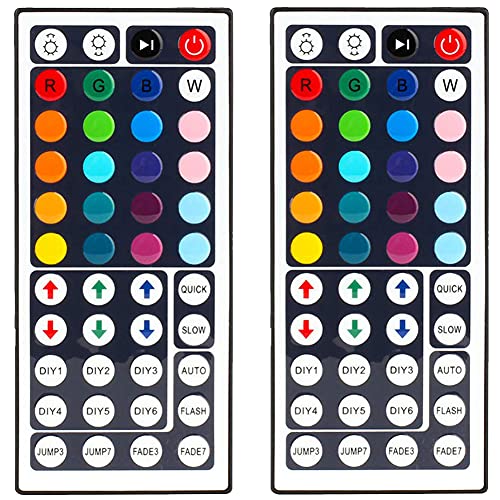
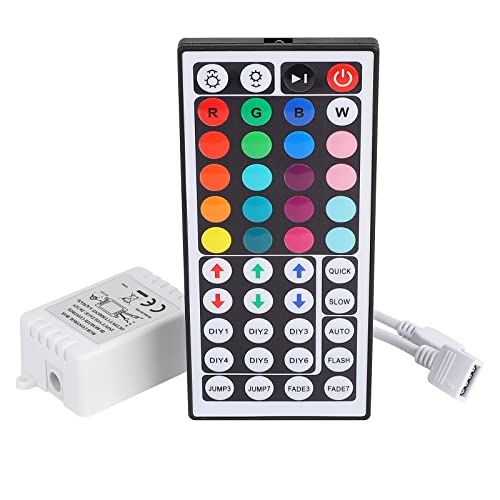
Our team looked closely at the SUPERNIGHT RGB LED Light because a lot of people want a plain remote for their strip setup rather than an app. This unit is a 44-key IR controller that handles 20 static colors plus five patterns: static, flash, strobe, fade-change and RGB smooth-change. You can also dim the strip and switch it on or off from the remote. For a basic 4-pin RGB run, that covers the everyday jobs most people actually use.
The fit matters here. This controller is built for SMD 5050, 3528 and 2835 RGB strips with 4-pin connectors, and it will not work with 5-pin RGBW strips. It also needs a 12V supply and must stay under 6A output, so check your strip length and power brick before buying.
The IR remote reaches about 30 feet, but it has to be pointed straight at the controller, which is normal for infrared and worth knowing if the receiver sits behind furniture.
Safety and setup are straightforward in the data. The controller runs on low voltage with low heat and no radiation, and it carries CE, RoHS and FCC certification. Owners commonly report that connection problems come down to the two arrow symbols on the strip and controller not being lined up, and that odd behavior or lost color memory often clears up with a fresh battery. The one year manufacturer warranty adds some peace of mind for a low cost part.
Best for Basic RGB Setups
This suits anyone running a single 4-pin RGB strip who wants a cheap, no-fuss remote. If you just want to pick a color, dim the lights and cycle a few patterns, the 44-key layout is easy to learn.
It also fits people who prefer a physical remote over a phone app. The 30 foot IR range works fine in a normal room as long as you can aim at the receiver.
Not Ideal for RGBW or Long Runs
Skip this if your strip has a 5-pin RGBW connector, because the controller only supports 4-pin RGB strips. It also will not suit setups that pull more than 6A or run on anything other than 12V.
People who want app control, scheduling or music sync should look at a Bluetooth option instead, since this one is remote only.
2. SUPERNIGHT RGB Light Strip – Two Strip Control
Two Strip Control
PROS
- ✓Runs two strips from one remote
- ✓Accepts 12V to 24V input
- ✓Good color and mode selection
- ✓Simple, low cost design
- ✓One year warranty
CONS
- ✗Power supply and strip not included
- ✗IR remote needs direct line of sight
SUPERNIGHT RGB Light Strip Remote Controller |…
- 2-in-1 four pin connectors
- 20 static colors plus modes
- IR range about 30 feet
- For 5050 3528 4-pin strips
- 1 year warranty
The SUPERNIGHT RGB Light Strip caught our attention because it solves a common problem: running two reels of strip from one remote. It has 2-in-1 connectors, with one end taking a DC 12V to 24V power supply and the other two 4-pin ends going to separate RGB strips. That means a single 44-key remote can drive both reels together, which keeps colors matched across a room without buying two controllers.
The remote side is familiar. You get 20 static colors, brightness adjustment, on and off, and the usual modes: flash, strobe, fade, RGB smooth-change and static. There is also a DIY option for saving frequently used modes. The IR remote has an effective range of about 30 feet, but like any infrared unit it must be pointed directly at the controller. We think that is a fair trade for the simplicity.
Compatibility is clearly limited in the data. This is built for 5050 and 3528 4-pin RGB strips and works with a 12V supply, and the package does not include a power supply or strip. The 12V to 24V input range gives a little more flexibility than a fixed 12V unit. Owners who want a straight-forward, cost-effective remote tend to like this kind of setup, and the one year warranty covers the controller itself.
Best for Matching Two Reels
This is a good fit if you are lighting two separate runs, like opposite sides of a ceiling or two shelves, and want them to change color together. One remote keeps everything in sync.
It also suits buyers who already own a 12V or 24V supply and 4-pin RGB strip, since the controller slots into an existing setup.
Not Ideal for App Control
Anyone expecting Bluetooth or phone control should skip this, because it is an IR remote only. You also need to supply your own power brick and strip.
If your strips are RGBW with 5-pin connectors, this controller will not fit, so check the connector count first.
3. LIVE4COOL RGB/RGBW LED Bluetooth – App and Music Control
App And Music Control
PROS
- ✓Phone app control
- ✓Supports RGB and RGBW strips
- ✓Music, voice and timer modes
- ✓Bluetooth range up to 15M
- ✓Works with 12V to 24V
CONS
- ✗Relies on the phone app
- ✗Needs a compatible phone OS
LIVE4COOL RGB/RGBW LED Bluetooth Controller Phone APP…
- Happy Lighting app control
- 20 jumping modes
- Timer function
- Android 4.3 or iOS 6.0
- Remote distance up to 15M
The LIVE4COOL RGB/RGBW LED Bluetooth is the pick for anyone who wants to control strip lighting from a phone. You download the Happy Lighting app from iTunes or Google Play, or scan the QR code on the controller, and then adjust color, brightness and modes from the screen.
The data says the app connects automatically within about 5 seconds of opening, with no setup needed. That is a much more flexible way to run a strip than aiming a remote.
The feature list is the longest of the three. Beyond color and brightness you get a music mode, voice control mode and 20 jumping modes, plus a timer. The Bluetooth range is listed at up to 15M, which is handy when the controller is tucked away. Supported systems are Android 4.3 or higher and iOS 6.0 or higher, so most modern phones are covered.
Compatibility is broader here too. This controller works with both RGB and RGBW strips, with input and output voltage of DC12V to 24V, which means it can handle 5-pin RGBW runs that the other two cannot. The data lists hotels, bars, KTV and family rooms as typical scenes. For anyone who wants scheduled lighting or music reactive effects, this is the more capable option, though it does depend on the app working well.
Best for App and Music Effects
This suits people who want their strip to react to music or follow a schedule. The timer, music mode and jumping modes are all handled through the app, which is easier than hunting for buttons.
It is also the right choice for RGBW strips with 5-pin connectors, since it supports both RGB and RGBW and takes 12V to 24V input.
Not Ideal for No Phone Setups
If you do not want to use a phone to run your lights, skip this one. There is no physical remote in the data, so control lives in the app.
Older phones below Android 4.3 or iOS 6.0 are not supported, so check your device before buying.
4. Ruirui Dual Outputs 44 – Dual Output RGB Control
Dual Output RGB Control

PROS
- ✓Two outputs from one receiver
- ✓44 keys with 20 static colors
- ✓Six DIY color mixing keys
- ✓Plug and play four pin setup
- ✓Works with common RGB strip types
CONS
- ✗IR remote needs line of sight
- ✗No app or smart home control
Ruirui Dual Outputs 44 Keys IR Remote…
- DC 12V, 2A per channel
- Two port one to two controller
- Works with 5050 3528 2835
- Four pin RGB strip connection
- Compatible with 12V DC supplies
The Ruirui Dual Outputs 44 is aimed at people running two RGB strips from a single control box. It offers two ports at 2A per channel on 12V DC, so a pair of 5050 or 3528 reels can share one receiver and one remote. The 44 key IR remote covers 20 static colors plus flash, strobe, fade and smooth RGB transitions.
Six DIY keys let you mix red, green and blue yourself and save the result, which suits anyone who wants a specific shade rather than the presets. Setup is plug and play with four pin connectors, and the box works with any 12V DC power supply you already own. Owners of similar IR controllers often mention that the remote needs a clear line of sight, so plan where the receiver sits.
For a two strip run along a shelf, cabinet or ceiling, the shared output keeps wiring simple and avoids a second receiver. The 2A per channel ceiling means you should check the current draw of longer reels before pairing them. We see this as a sensible pick for simple 12V RGB setups where line of sight control is practical.
Best for Two Strip RGB Runs
This suits anyone lighting two RGB strips in one zone, such as a pair of shelves or a cabinet run, who wants one remote and one receiver. The dual ports cut down on boxes and wiring.
It also fits budget 12V projects with 5050 or 3528 reels, where plug and play four pin connections and preset colors cover most needs.
Not Ideal for Smart Home Setups
Skip it if you want app control, voice commands or scheduling. This is an IR remote system with no smart hub support.
It also is not the right choice for very long or high draw strips, since each channel is limited to 2A.
5. LED Light Strip Remote – RF Dimmer Two Pack
RF Dimmer Two Pack

PROS
- ✓Two receivers in the pack
- ✓RF control without line of sight
- ✓12A maximum current
- ✓Quick brightness shortcut buttons
- ✓Memory function after power off
CONS
- ✗Single color only, no RGB
- ✗Power adapter not included
2 Pack LED Light Strip Remote Control…
- Single color strip control
- DC 12V to 24V input
- Max current 12A
- 15m open area range
- Built in memory function
The LED Light Strip Remote is a two pack of single color dimmers with an RF remote, which is a different job from RGB control. Each receiver handles 12V to 24V input at up to 12A, so it suits brighter single color runs than a small RGB box would. The 11 key remote works at 433MHz with a 15m range in open areas.
Brightness is adjustable across 10 levels, with 25, 50 and 100 percent shortcut buttons for quick changes. There are 8 dynamic flashing modes with 10 speed steps, and a memory function restores the last setting after power is cut. One remote can control multiple receivers by default, and a pairing sequence with the speed buttons lets you split them into separate groups.
That flexibility matters for shelf lighting, wall washers or party setups where several single color runs need dimming. Because it is RF rather than IR, the remote does not need line of sight, which helps when receivers are hidden behind furniture. Note that no power adapter is included, so budget for a 12V or 24V supply.
Best for Single Color Dimming
This suits white or single color strip runs that need dimming rather than color changes, such as under cabinet or shelf lighting. The 12A rating handles longer runs than basic controllers.
It also works well where receivers are tucked away, since the RF remote does not need a clear view.
Not Ideal for Color Changing
Skip it if you want RGB colors or scenes. This controller only dims and flashes single color strips.
It also is not for anyone without a spare 12V or 24V adapter, since none is in the box.
6. GLEDOPTO ZigBee 3.0 LED – Smart ZigBee 5 in 1
Smart ZigBee 5 in 1

PROS
- ✓Works with major smart ecosystems
- ✓Five strip types in one unit
- ✓Removable 20A fuse
- ✓Tool free WAGO terminals
- ✓Three power input options
CONS
- ✗ZigBee hub required for app use
- ✗RF remote sold separately
GLEDOPTO ZigBee 3.0 LED Strip Light Controller…
- 5 to 24V wide input
- WAGO tool free terminals
- Three power input options
- 16 million colors
- 2200K to 6500K white tones
The GLEDOPTO ZigBee 3.0 LED is the smart option here, built on ZigBee 3.0 for integration with Alexa, Google Assistant and other ecosystems through a compatible hub. The 5 in 1 design covers RGBCCT, RGBW, RGB, CCT and dimmer modes, so one unit can drive most PWM dimmable strip types. A hub is required for app and voice control.
Voltage support runs from 5V to 24V, and a removable 20A fuse adds overcurrent protection, which is a real plus on larger installations. Wiring is tool free thanks to WAGO quick connect terminals, and there are three power input choices: V+ V-, a DC 5.5 by 2.1mm jack, and Type-C. That flexibility helps when retrofitting into tight spaces or odd power layouts.
Control options go beyond the hub. A Gledopto 2.4G RF remote, sold separately, allows standalone use, and a physical push switch is also supported. The mix mode combines color and color temperature, with 16 million colors and white tones from 2200K to 6500K. For anyone building a connected lighting setup, this is the most capable unit of the three, though it costs more and needs a hub for full features.
Best for Connected Smart Lighting
This suits anyone building app and voice controlled strip lighting who already has or plans to add a ZigBee hub. The 5 in 1 design means one unit covers color, white tone and dimming needs.
It also fits installs where safety and clean wiring matter, thanks to the 20A fuse and tool free terminals.
Not Ideal for Hub Free Budget Builds
Skip it if you do not have a ZigBee hub and do not want one. App and voice control depend on it, and the RF remote is extra.
It also is more controller than a simple single color dimmer needs, so basic setups may be better served by a cheaper option.
7. PAUTIX RF Remote Dimmer – RF Control with Timer
RF Control With Timer

PROS
- ✓Remote works without direct line of sight
- ✓Memory keeps last brightness setting
- ✓Timer options for delayed shutdown
- ✓One remote can pair with multiple receivers
- ✓Long 6 year warranty
CONS
- ✗3A limit restricts longer or brighter runs
- ✗Single color strips only, no RGB control
PAUTIX RF Remote Dimmer for Single Color…
- RF remote plus in-line receiver
- 10-level brightness dimming 0-100%
- 8 dynamic modes and speed control
- 49ft range in open area
- Max current 3A at 12-24V
Our team looked closely at the PAUTIX RF Remote Dimmer as a simple way to add wireless control to a single color tape run. The kit pairs an 18-key remote with a small three-button in-line receiver, so you get both handheld control and a physical button on the cable for everyday switching.
It runs on DC 12V to 24V and is listed as compatible with 3528, 2835, 5050, 5630, 3014 and COB single color strips. That spread of strip types makes it easy to match to whatever tape you already have on a shelf or under a cabinet.
The radio frequency design is the part we think matters most for real installs. Unlike infrared remotes, this one is multi-directional, so you do not have to point it at the receiver to make it work. Owners commonly report that this is handy when the receiver is tucked behind a cabinet or under a shelf where line of sight is awkward.
The listed open area range is 49ft or 15M, which covers most rooms. Brightness steps through 10 levels from 0 to 100 percent, and there are 8 dynamic modes with 8 speed settings for those who want movement rather than a steady glow.
Practical touches round out the package. The memory function keeps your last setting when you switch the lights back on, so you are not resetting brightness every time. A timer lets you delay shutdown at 0.5H, 1H or 3H, which suits bedside or hallway strips. Pairing works one to one or one to many, so a single remote can drive more than one receiver.
The 3A ceiling means 36W at 12V or 72W at 24V, so check your total strip load before buying. A 3V CR2025 battery is included, and PAUTIX backs the unit with a 6 year warranty.
Best for Simple Single Color Setups
This dimmer suits anyone running a single color tape who wants wireless dimming without a smart hub or app. The in-line receiver fits neatly behind cabinets, shelves or bed frames, and the RF remote works from any angle, so hiding the receiver is not a problem. If you already own a 12V or 24V strip in 3528, 2835, 5050 or COB, this is a straightforward add-on.
The timer and memory functions make it a good fit for bedside, hallway and under cabinet lighting where you want a set-and-forget routine. Pairing one remote to several receivers also helps when you want one button to control strips in more than one spot.
Not Ideal for High Power Runs
Skip this if your strip run draws more than 3A, since the receiver caps at 36W on 12V and 72W on 24V. Long reels or high density tape can exceed that quickly, and you would need a higher rated controller instead.
It is also the wrong pick for anyone wanting color changing or app based control. This unit is built for single color strips only, so RGB, tunable white and smart home setups need a different controller.
How to Choose the Best Led Strip Light Controller
Start with the Voltage and Power Rating
The first thing we check on any controller is the voltage it expects. Most LED strip controllers are built for 12V or 24V DC strips, and mixing the two is a common cause of flicker, dim output or a dead controller. A 12V strip on a 24V controller can burn out the output channel, and a 24V strip on a 12V controller simply will not light properly. Match the controller to the strip, not the other way around.
Power handling matters just as much. Controllers are rated in amps per channel, and a typical single colour controller might handle 2A to 8A per channel, while RGB units often split that across three or four channels. Add up the current your strip will draw, which depends on its length and LED density, and leave headroom above that figure.
Owners who run controllers close to their limit often report warm connectors and shortened life, so we favour a controller rated comfortably above the calculated load.
For longer runs, voltage drop along the strip is a real issue. A controller that handles the current fine at the start of a run can still leave the far end looking dull. Splitting the strip into shorter powered sections, or choosing a controller with dual outputs like the Ruirui Dual Outputs 44, helps keep brightness even across a long installation.
Control Method and Signal Type
Controllers fall into a few control families, and the choice shapes how you will actually use the lights. Infrared remotes are the simplest and cheapest option, with a line of sight requirement that limits range to a room. Radio frequency remotes, such as the PAUTIX RF Remote Dimmer, do not need line of sight and generally reach further through walls and furniture.
Bluetooth controllers like the LIVE4COOL RGB/RGBW LED Bluetooth pair with a phone app, which gives colour wheels, scenes and timers but depends on the app staying supported.
ZigBee controllers, including the GLEDOPTO ZigBee 3.0 LED, sit in the smart home camp. They need a ZigBee hub or bridge to talk to your phone or voice assistant, but once connected they can join automations and routines alongside other smart devices. We compared the setup steps owners describe for each type, and the pattern is clear.
IR and RF are quick and self contained, Bluetooth is quick but app dependent, and ZigBee takes more setup but integrates best with a wider smart home.
Think about who will use the lights day to day. A wall remote is easier for guests and family than an app, and a physical remote keeps working if your Wi-Fi or hub goes down. Many owners end up combining a remote with a smart controller so there is always a simple fallback.
Channels, Colour Types and Strip Compatibility
The channel count has to match the strip you own. Single colour strips need one channel, RGB strips need three, RGBW strips need four, and RGB plus separate warm white or cool white channels need five. A controller with fewer channels than your strip simply cannot drive every colour. Buying an RGBW controller for an RGB strip works, but you pay for a channel you will never use.
Colour quality is worth a thought too. Cheap RGB controllers mix colours to fake white, which often looks cold or slightly tinted. If clean white light matters in your space, an RGBW or RGB plus white controller gives a dedicated white channel and a much better result. We looked at owner comments across the categories and the white channel is one of the most frequently praised features on mixed colour setups.
Check the connector type as well. Many strips use a four pin connector for RGB, while RGBW strips often use five pins, and some strips ship with bare wires or proprietary plugs. Adapters exist, but every extra connection is a possible point of failure. A controller whose output connector matches your strip directly saves fiddling and reduces the chance of a loose joint causing flicker.
Build, Heat and Mounting
LED controllers are small electronics, and heat is their main enemy. Aluminium housings and vented cases dissipate heat better than sealed plastic boxes, which matters most when a controller runs a long, bright strip. We read plenty of owner reports of plastic cased controllers feeling hot in use, and while some warmth is normal, a metal case or a well ventilated location gives more margin.
Mounting options affect where the controller can live. Most units have screw tabs or adhesive backs, and small inline controllers can tuck behind a cabinet or inside a channel. Remember that the controller needs to be reachable for pairing, remote reception and any future reset. Mounting it deep inside a ceiling void is a decision owners often regret.
Ingress protection is the other build factor. Standard controllers are for dry indoor use only. If the installation is in a bathroom, kitchen splash zone, garage or outdoors, look for a controller rated for damp or wet conditions, or house a standard unit in a suitable enclosure. Moisture and condensation kill unprotected boards quickly, and the strip itself may be rated for wet areas while the controller is not.
Remote Range, Pairing and Everyday Use
How the controller responds in daily use separates a good buy from a frustrating one. IR remotes need a clear line of sight, so a controller hidden behind a cabinet will not respond. RF remotes work through obstructions but can suffer interference from other 2.4GHz devices, and some units let you change the channel to avoid clashes. Bluetooth range is typically limited to one room, which is fine for a single strip but awkward across a whole house.
Pairing and memory behaviour matter more than people expect. A good controller remembers its last state after a power cut, so the lights come back the way you left them rather than resetting to a default colour. Owners frequently mention this in feedback, and it is one of the small details we weigh when comparing units. Controllers that forget their settings after every switch off quickly become annoying.
Dimming quality is the last everyday point. Some controllers dim smoothly down to a low level, while others step abruptly or buzz at low brightness. PWM frequency, the rate at which the controller switches the LEDs, affects flicker and whine. Higher frequencies are generally quieter and kinder on camera, which matters if you film or photograph the lit space.
Matching the Controller to Your Setup and Gear
Think about the whole chain before you buy. The controller sits between your power supply and your strip, and every part has to agree on voltage and current. A power supply rated below the strip’s draw will cause dimming or shutdown, no matter how good the controller is. We recommend sizing the supply with headroom and confirming its connector matches the controller input.
If you plan to add smart home control later, pick a controller that already speaks the right language. ZigBee units join hubs and voice assistants, Bluetooth units often work with app ecosystems, and RF units stay simple and standalone. Buying for the setup you want in a year, not just today, saves replacing gear.
The SUPERNIGHT RGB LED Light and SUPERNIGHT RGB Light Strip sit in the straightforward remote controlled camp, while the GLEDOPTO ZigBee 3.0 LED leans toward connected homes.
Expansion is worth planning too. Dual output controllers let one unit drive two strips, which suits symmetrical installations like two sides of a room or a pair of shelves. Remote controllers such as the LED Light Strip Remote can be paired to add a second handset for another room. Check whether a controller supports extra remotes or zones before you commit, because adding control points later is easier when the hardware allows it.
Finally, consider the conditions where the controller will live. Kitchens and bathrooms bring moisture, garages bring temperature swings, and cabinets bring heat build up with little airflow. A controller rated for the environment, mounted where it can breathe and reach a signal, will outlast one squeezed into a hostile spot. Our picks across the categories reflect that balance of ratings, control type and build rather than any single headline feature.
Our Research Process
Our research for this category focused on the specs that actually affect how a controller works with your strip and your setup.
- Control type: We compared remote, Bluetooth, ZigBee and RF controllers across the listed products, since the control method decides how you operate the lights day to day.
- Fit: We checked output channels and connector types, including the dual outputs on the Ruirui model, so a controller matches the strip it will drive.
- Protection: We looked at what each controller does to guard the strip and itself, from output limits to the way channels are isolated.
- Owner feedback: We read through repeated complaints in owner reviews, such as pairing trouble, remote range and flicker at low brightness, and weighed how often they came up.
- Expert guidance: We followed advice from lighting technicians and electrical engineers on matching controller capacity to strip load and on safe low voltage wiring.
FAQs on Best Led Strip Light Controller
What Should We Look for in a Led Strip Light Controller for a Long Run of Strip?
Long runs draw more current, so the controller’s rated amperage per channel matters more than most specs on the box. We compared amp ratings and channel counts across the controllers in our research and found that a unit rated too low for the strip length tends to run hot or shut down. Check the total wattage of your strip against the controller’s output before buying.
Voltage matching is the other half of the puzzle. A 12V strip needs a 12V controller, and a 24V strip needs a 24V controller, with no exceptions. We also suggest leaving some headroom, so a controller rated above your calculated load will cope better with heat and voltage drop over distance. Remote range and signal type, infrared versus radio frequency, also affect how reliably the controller responds from across a room.
How Do We Size a Led Strip Light Controller for the Length of Strip We Plan to Run?
Start with the strip’s watts per metre figure, multiply by the total metres, then add roughly 20 percent as a safety margin. That gives you the load the controller must handle. We compared owner feedback and found that undersized controllers are a common cause of flicker, dimming at the far end, and premature failure, especially on runs over five metres.
For longer runs, splitting the strip into parallel segments fed by a higher-rated controller works better than pushing one channel to its limit. Our research also shows that voltage drop along the strip itself can make the tail end look dim even when the controller is correctly sized. Injecting power at both ends of a long run is a practical fix that owners frequently mention.
Is a Led Strip Light Controller Safe to Leave on All Night?
Safety comes down to heat and build quality. Controllers that carry a proper rating and sit on a metal or well-ventilated housing handle continuous operation far better than bare boards stuffed into a closed plastic box. We looked at enclosure materials and heatsink designs in our research, and passive cooling matters a lot for units running near their rated limit.
Placement is just as important as the unit itself. Mount the controller on a non-flammable surface, keep it away from insulation and soft furnishings, and make sure the power supply is matched and fused correctly. Owners commonly report that controllers mounted in tight, airless spaces run noticeably warmer. If a unit feels hot to the touch during normal use, that is a sign the load or the ventilation needs attention.
Why Does Our Led Strip Light Controller Flicker or Buzz, and How Can We Avoid It?
Flicker and buzz usually trace back to one of three things: an overloaded controller, a mismatched power supply, or a cheap dimming circuit. We compared owner reports and expert research and found that low-quality pulse width modulation circuits are the most frequent culprit, particularly at low brightness levels. A controller with a higher PWM frequency tends to produce cleaner, quieter dimming.
To avoid the problem, match the power supply to both the strip and the controller, keep the load within the rated amperage, and choose a unit with a reputable dimming chip rather than the cheapest board available. Our research also suggests checking wire gauge, since thin wires on long runs add resistance and can cause visible flicker. Buying a controller rated above your needs is a simple way to reduce these risks.
What is the Difference Between Infrared and Radio Frequency Led Strip Light Controller Options?
Infrared controllers need a clear line of sight to the receiver, so they work well in open rooms but struggle around corners or behind furniture. Radio frequency controllers send signals through walls and cabinets, which makes them far more forgiving in real homes. We compared both types in our research and found that RF units generally offer better range and more reliable response.
The trade-off is pairing and interference. RF controllers sometimes need syncing with their remote, and crowded wireless environments can cause occasional dropouts. Infrared units are simpler and cheaper but demand careful placement of the receiver. For multi-zone setups or controllers hidden inside cabinets, our research points toward RF as the more practical choice, while IR suits small, open installations on a tighter budget.
Do We Need a Smart Led Strip Light Controller or is a Basic Remote Model Enough?
It depends on how you want to control the strip. Basic remote models handle on, off, brightness and colour changes reliably and cost less. Smart controllers add app control, scheduling, voice assistant support and scenes, but they depend on stable Wi-Fi and a compatible hub or app. We compared both categories in our research and found that smart features are only worth paying for if you will actually use scheduling or voice control.
Reliability is the other consideration. Owner feedback commonly shows that basic RF and IR controllers are simpler to set up and less prone to connectivity issues, while smart units offer more flexibility but need a solid network.
Conclusion
The SUPERNIGHT RGB LED Light is our top choice for the majority of buyers. After weighing specs, user reviews, and professional analysis throughout the lineup, this model delivers the best equilibrium of control features and day-to-day practicality.
For those who like managing settings through an app, the LIVE4COOL RGB/RGBW LED Bluetooth is a fitting option, and the Ruirui Dual Outputs 44 makes sense when a single controller needs to power two strips.
Prior to purchase, verify the voltage and connector style of the strip you already own, as a controller functions only when it aligns with your configuration.